
Features
How do I break a subject into topics and track time on each?
Verified on: October 27, 2026
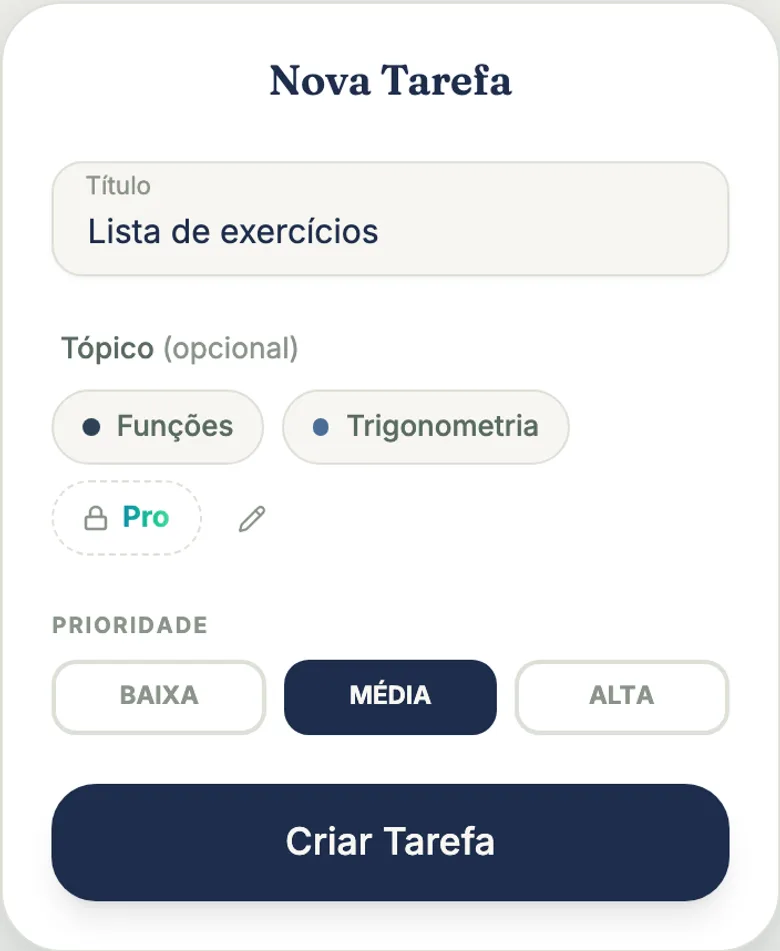
A topic in tudy is a theme inside a subject, like “Derivatives” in Calculus or “The Cold War” in History. You tie topics to tasks and timer sessions, and Stats starts showing how much time you gave each one. The Free plan includes 2 topics per subject; Pro makes them unlimited.
What a topic is for
Without topics, tudy says “you studied 4 hours of Calculus.” With topics, it says “3 hours on Derivatives and 1 hour on Limits.” If you’re prepping for an exam with several units, that difference shows you what you’ve been avoiding.
We call it a topic, not a tag or a label, because it’s the word students already use for the content inside a class. A topic isn’t a loose hashtag: it belongs to one subject and only makes sense inside it.
How to create and use them
- Open a task form (or the timer picker) in a subject.
- In the row of topics, tap + and type a name.
- Tap a topic to choose it: one at a time, and tapping it again clears it.
The pencil at the end of the row opens the manager, where you rename or delete topics. The same shortcut lives in the subject’s options menu. See Subjects. Names can’t repeat inside one subject (upper and lower case count as the same).
A topic can be tied to:
- a task, which shows the topic as a label on its row and card;
- a focus timer session, chosen while the timer is stopped;
- a manual time entry, when the subject has topics.
A task with no subject has no topic.
Topics in Stats
In Stats there’s a Subjects / Topics toggle. In Topics mode you get a donut chart with a legend showing time, percentage and completed tasks for each topic, with a filter by subject. Time with no topic shows in gray as General, so the math doesn’t lie. With no subject filter, all the “General” time collapses into one row.
A topic doesn’t pick its own color: it inherits the subject’s color in slightly different shades. That way, on the overall chart, the color family tells you which subject each slice belongs to.
What’s free and what’s Pro
| Free | Pro | |
|---|---|---|
| Topics per subject | 2 | unlimited |
| Tie to tasks, timer and manual time | yes | yes |
| Time per topic in Stats | yes | yes |
If you were on Pro and went back to Free, you don’t lose topics. The ones over the limit stay visible, keep counting in Stats and show a lock, but can’t be attached to new items. The limit is enforced in the database.
Pro is $3.99 a month or $29.99 a year, paid by card.
What topics don’t do
- One item, one topic. A task or session can’t carry two topics. This avoids splitting time between them.
- They don’t exist outside a subject. You can’t have one shared “general” topic across two subjects.
- They have no color of their own and no filter in the task list. They show as a label, and their main job is measuring.
- They don’t attach to notebooks or flashcards. Today a topic links to tasks, the timer and manual time.
A practical tip
Start with the big units on your syllabus, not every lecture. Two to four topics per subject already give you a useful picture. If you’re on Free, pick the 2 areas where you most need to keep score and leave the rest as “General.”
Frequently asked questions
What is a topic in tudy?
A theme inside a subject, like Functions, the French Revolution or Irregular Verbs. You tie a topic to a task or a timer session, and Stats shows your time per topic.
How many topics can I create for free?
Two per subject on the Free plan. On Pro they're unlimited.
Can I put more than one topic on a task?
No. Each task or session has at most one topic. That's on purpose: time doesn't have to be split, so the percentages add up to 100%.
What if I delete a topic?
Your tasks and sessions stay. They just go back to having no topic and show up as General in Stats.