
Features
How do I track how long I study each subject?
Verified on: October 27, 2026
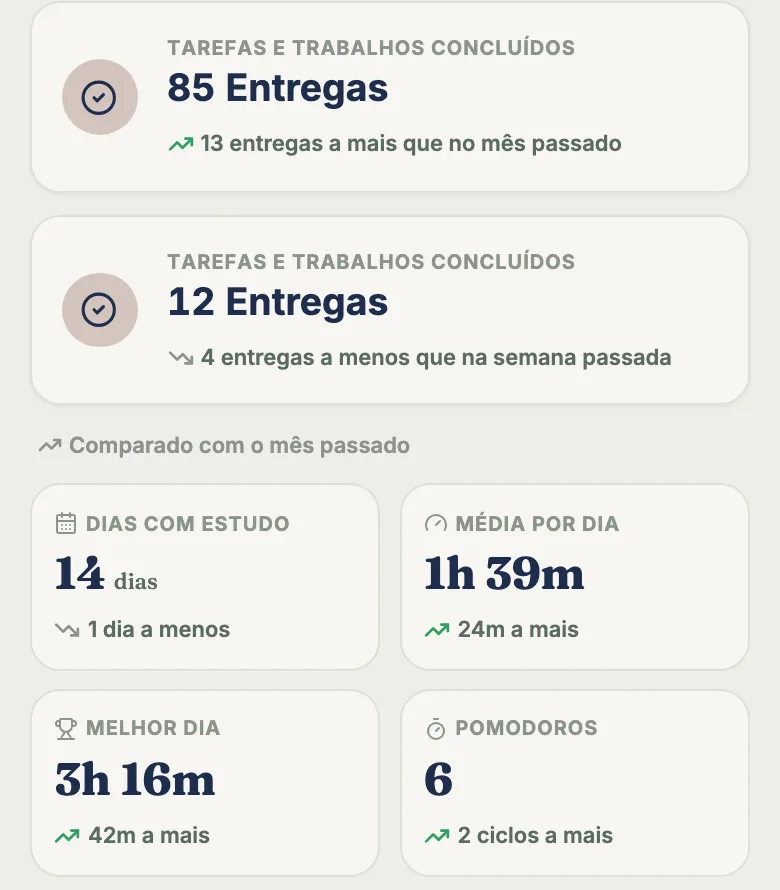
tudy Stats answers “how much did I study, and on what?”: the time comes from the timer (or what you log by hand), and the screen splits it by subject and by topic. The basics are free. Pro unlocks the period summary, the evolution charts and the Insights tab, with a heatmap and your weekly rhythm.
The three tabs
The Stats screen has three tabs: Time, Completed and Insights. On all of them you pick the period (Day, Week, Month or All) and step back through earlier periods.
Time
This shows how long you studied, in a donut chart with the total in the middle and a list by subject with each one’s percentage. Tap a subject to open its timer. The Subjects / Topics toggle changes the split: in Topics mode you see how much went to each topic, with a filter by subject. Time with no topic shows in gray as General.
On Pro, the Time tab adds a period summary (study days, average per study day, best day and full Pomodoros) and a focus over time chart.
Completed
This shows how many tasks you finished in the period. On Pro it opens up a completion breakdown: percent on time, how many were late, the average head start you give yourself before a deadline and how many are still open, plus completions over time and by subject.
Insights (Pro)
- Consistency map for the last 4 months: the more points in a day (tasks, subtasks and flashcard rounds are worth points, and so are minutes of focus), the darker the color. Tap a day to see what you did.
- Weekly rhythm: your average focus by weekday over the last 8 weeks.
- Records: best day, longest streak, total focus and number of sessions.
- Where your XP comes from: tasks, timer, flashcards and streak milestones.
- Flashcards for the last 30 days: cards, accuracy and rounds.
Manage time
Studied without the timer? In Manage time, you log hours by hand: subject, optional topic, date, length and an optional start time. With no start time, tudy uses the current time. The app won’t accept an entry that would end in the future. A list of recent entries lets you delete a mistake. Manual time shows up in Stats and keeps your streak, but earns no XP.
What’s free and what’s Pro
| Free | Pro | |
|---|---|---|
| Total time and time by subject | yes | yes |
| Time by topic | yes | yes |
| Completed tasks (count) | yes | yes |
| Period summary and focus over time | no (blurred) | yes |
| Completion breakdown | no (blurred) | yes |
| Full Insights tab | no (blurred) | yes |
On Free, Pro blocks appear blurred over sample data: you see the shape of what you’re missing, not fake numbers passed off as yours. Pro is $3.99 a month or $29.99 a year, paid by card.
What Stats doesn’t do
- It doesn’t measure anything you didn’t log. If you studied without the timer or logging the time, it doesn’t exist here.
- It doesn’t measure what you learned. Time studied isn’t a grade.
- It doesn’t export reports to a spreadsheet or PDF.
- It doesn’t compare you with other people. That’s what the leaderboard is for.
- It doesn’t load charts offline.
Keep it simple
A two-minute review on Sunday night is enough: open the Time tab for the week, check whether the split by subject matches what matters for your exams, and adjust next week. If a class that carries a big final shows up with 5% of your time, that’s your cue to move things around.
Frequently asked questions
Are tudy's stats free?
Partly. On Free you see total time and the split by subject and by topic, plus a count of completed tasks. The period summary, evolution charts, deadline breakdown and the Insights tab are Pro.
Where does the time data come from?
From the focus timer and from time you log by hand in Manage time. Counts under 1 minute aren't logged.
What looks blurred on the Free plan?
Pro blocks appear blurred over sample data so you can see their shape. The sample numbers aren't yours.
Can I see time per topic?
Yes, even on Free. A toggle switches between Subjects and Topics, with a donut chart, a legend and a subject filter.