
Features
What's a good to-do app for students?
Verified on: October 27, 2026
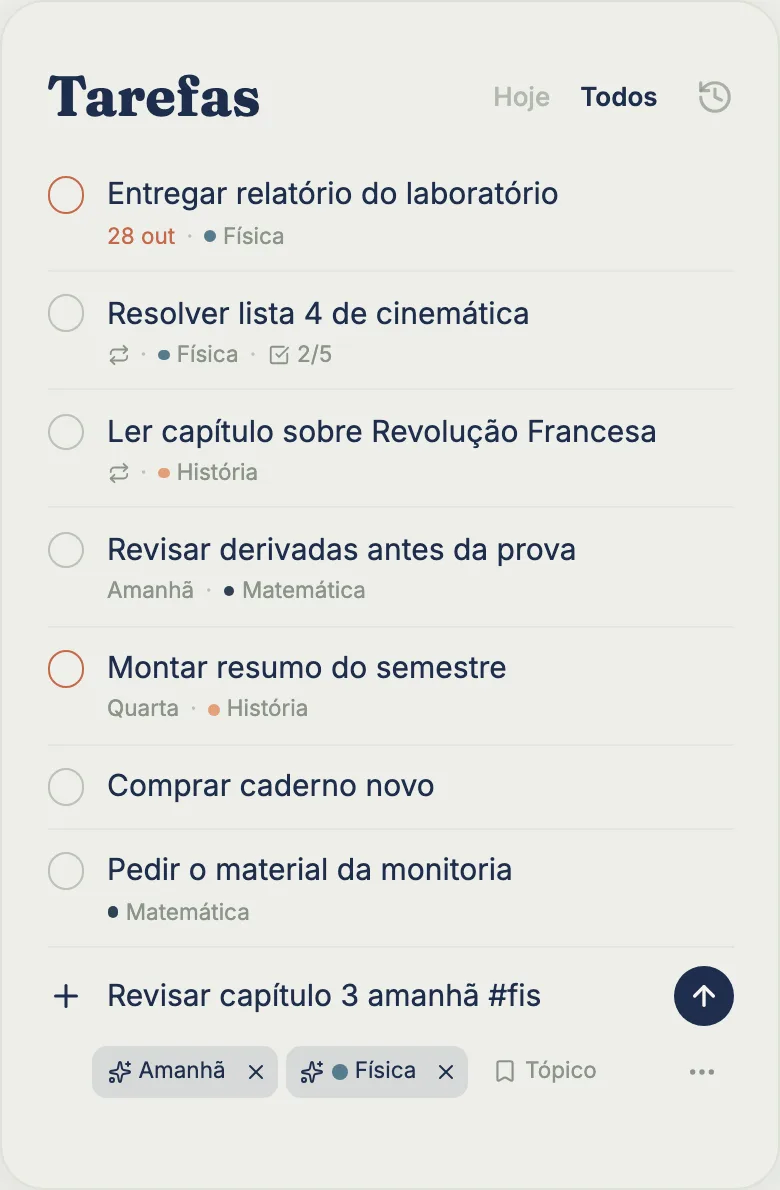
tudy’s Tasks screen is a fast list: you type, press Enter and the task exists, with or without a subject and with or without a date. Tasks, subtasks and due dates are unlimited on the Free plan. Completing a task earns 5 XP and keeps your streak going for the day.
How to add a task in a few seconds
On the Tasks screen, the last row of the list is the add box. Type a title and press Enter: the task goes in and the cursor stays there for the next one. When the box is active you get quick options for Date, Subject, Topic and “⋯”, which opens the full form already filled in. Date words work too: “Submit lab report friday” becomes a task due this Friday.
With no choices made, a new task is due today. If you push it off, it turns red as overdue, which makes it hard to lose. For a task with no date at all, remove the “Today” chip.
What fits inside a task
Tap a row to open the form: description, subtasks (each with its own date), priority (low, medium, high), difficulty (easy, medium, hard), subject and topic. You can also drag to reorder: on a computer, with the handle next to the row; on a phone, by pressing and holding the row for a moment. The order you set is the order you keep.
Completed tasks go to a history (the clock icon at the top). When you complete one, an “Undo” message appears in case it was a mis-tap.
Repeating tasks (Pro)
On Pro, a task can repeat every day, on weekdays, every week, every month or on a custom schedule (every N days, weeks or months, with weekdays you pick). When you complete it, tudy creates the next one.
It never piles up: each series has at most one open task. Forget a daily task for ten days and you have one task that is ten days overdue, not ten tasks. When you delete a repeating task, you choose just this one (it skips to the next date) or all of them (it stops repeating and your history stays).
Think of it as the fix for “read the chapter summary every Monday” or “review vocab every day” without a wall of copies.
Where your tasks show up
The same task appears in several places: the Tasks list, the subject’s tab, the Calendar as a deadline, and your delivery numbers in Stats. tudy can also send a notification when a deadline is due the next day, if you turn reminders on. A task without a date doesn’t trigger a reminder.
What’s free and what’s Pro
| Free | Pro | |
|---|---|---|
| Tasks and subtasks | unlimited | unlimited |
| Due date, priority, difficulty | yes | yes |
| Reordering, history, XP | yes | yes |
| Repeating tasks | no | yes |
Pro is $3.99 a month or $29.99 a year, paid by card.
What the Tasks screen doesn’t do
- It has no filters or sections. It’s one list on purpose: the due date, subject and subtasks show on the row itself.
- It doesn’t sync with Google Calendar. To get deadlines and exams onto your phone’s calendar, there’s an .ics export, which is a Pro feature.
- It doesn’t give unlimited XP. There is a daily XP cap for tasks and a pace limit (at most 10 completions with XP every 10 minutes). Past that, the task still counts toward your streak. It just doesn’t add XP.
- It only reads simple date words. “Friday”, “tomorrow”, “the 30th” and “11/3” become a due date as you type; abbreviations like “fri” don’t, on purpose, and anything more complex goes through the Date option.
Quick questions
Can I use tasks without any subjects? Yes. A task with no subject lives in the Tasks list and, if it has a date, in the Calendar.
Is this the same as a homework planner? It covers that: assignments are just tasks with a due date, a description and subtasks. If you also want exams and class times, add the Calendar.
Frequently asked questions
Are tasks unlimited on tudy's Free plan?
Yes. Tasks, subtasks and due dates have no limit on Free. Only tasks that repeat automatically are part of Pro.
Do I have to pick a subject and a date to create a task?
No. Both are optional. By default a task is due today, and you can remove the date or pick another one.
Does finishing a task earn XP?
Yes. Each task or subtask you complete is worth 5 XP and counts toward your streak for the day, up to a daily cap that prevents abuse.
Can I make a task that repeats every day?
Yes, on Pro. A task can repeat daily, on weekdays, weekly, monthly or on a custom schedule. It never piles up: there is only ever one open copy.