
Features
Is there a study calendar that handles exams, classes and deadlines?
Verified on: October 27, 2026
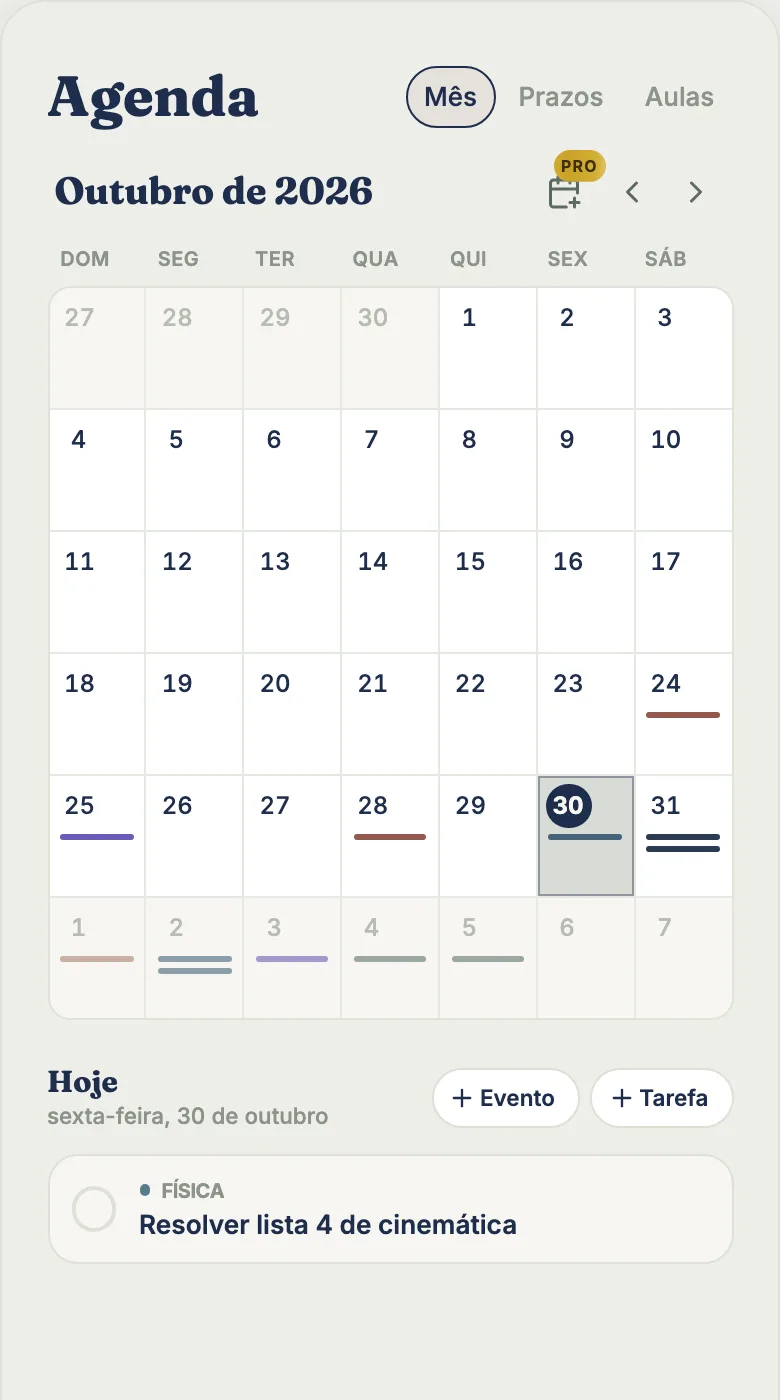
tudy’s Calendar is built for students: it puts your exams, events, no-class days and the due dates of your tasks in one place. Exams and events are free. Pro adds a weekly class schedule that repeats on its own and export to your phone’s calendar.
What the Calendar shows
The Calendar has three modes, switched with tabs at the top:
- Month: the month grid with exams, events, deadlines and no-class days, each in its subject’s color. Only an overdue deadline changes color (red). Swipe sideways to change months. Tap a day to open its list, with “Event” and “Task” buttons.
- Classes: your weekly class schedule, as a list on a phone or seven columns on a computer. Deadlines and exams don’t appear here, only classes.
- Deadlines: the original Deadlines screen, intact, with a list by period (day, week, month, all) and, on a computer, a Kanban board with drag and drop.
The Calendar took Deadlines’ spot in the navigation, and old links to Deadlines still work.
Deadlines and events are different things
A deadline is a task with a date: you complete it, earn XP and it counts toward your streak. An event is something that happens: an exam, an event, a class or a no-class day. You don’t complete an event. It just happens.
An event has a type, a title, an optional subject, a date, optional start and end times, a location and a note.
Add an exam by typing a sentence
In the title of a new event, type it the way you’d say it: “physics exam friday 2pm”. tudy picks up the type (exam), the subject (Physics), the day (the next Friday) and the time (2:00 PM), and shows a “Got it” line with what it read. If you change a field by hand, it won’t be overwritten. Words like exam, test, quiz, midterm and finals become an exam type. The Tasks screen reads date words the same way when you add a task.
No-class days
A No class event with no subject hides every class that day. With a subject, it hides only that subject’s classes. So a holiday or a canceled lecture clears the class from your schedule without deleting it.
What’s free and what’s Pro
| Free | Pro | |
|---|---|---|
| Monthly view, exams, events | yes, no limit | yes |
| No-class days and one-off classes | yes | yes |
| Deadlines mode (list and Kanban) | yes | yes |
| Classes that repeat every week, Class schedule | no | yes |
| Export to your calendar (.ics) | no | yes |
The Class schedule lets you enter every class of the week at once, and they repeat on their own until a date you choose (or forever). The export creates an .ics file, right in your browser, for the month, the week or one event; repeating classes export as a repeat rule, not as copies. On Free, the schedule shows blurred sample data and an invitation.
Pro is $3.99 a month or $29.99 a year, paid by card.
What the Calendar doesn’t do
- It doesn’t sync with Google Calendar or Apple Calendar. An .ics export is a snapshot, not a live connection that updates itself.
- It doesn’t build a review plan before an exam automatically. For that you can ask Talk to tudy, which proposes dated tasks and only creates them after you confirm.
- It has no reminder just for exams. The reminder that exists is for a task due the next day.
- It doesn’t flag busy weeks or count exams per week. The grid shows what’s scheduled, and that’s all.
Quick questions
Does it work on a phone? Yes, with the same clean layout. See how to add tudy to your home screen.
Do exams get a special color? No. An exam uses its subject’s color like any other item, and a small graduation cap icon in the list marks it as an exam.
Frequently asked questions
Does tudy's Calendar sync with Google Calendar?
No. tudy doesn't sync with Google Calendar. On Pro you can export the month, the week or a single event as an .ics file and import it into your phone's calendar.
What's free in the Calendar?
The monthly view, exams, events, no-class days, one-off classes and the Deadlines mode. Classes that repeat every week, the class schedule and .ics export are Pro.
Can I add an exam by typing a sentence?
Yes. Type something like 'physics exam friday 2pm' in the event title and tudy fills in the type, subject, day and time.
What happened to the Deadlines screen?
It became a mode inside the Calendar, with the same list by period and, on a computer, the Kanban board.