
Features
Is there an AI that builds my study plan and organizes my tasks?
Verified on: October 27, 2026
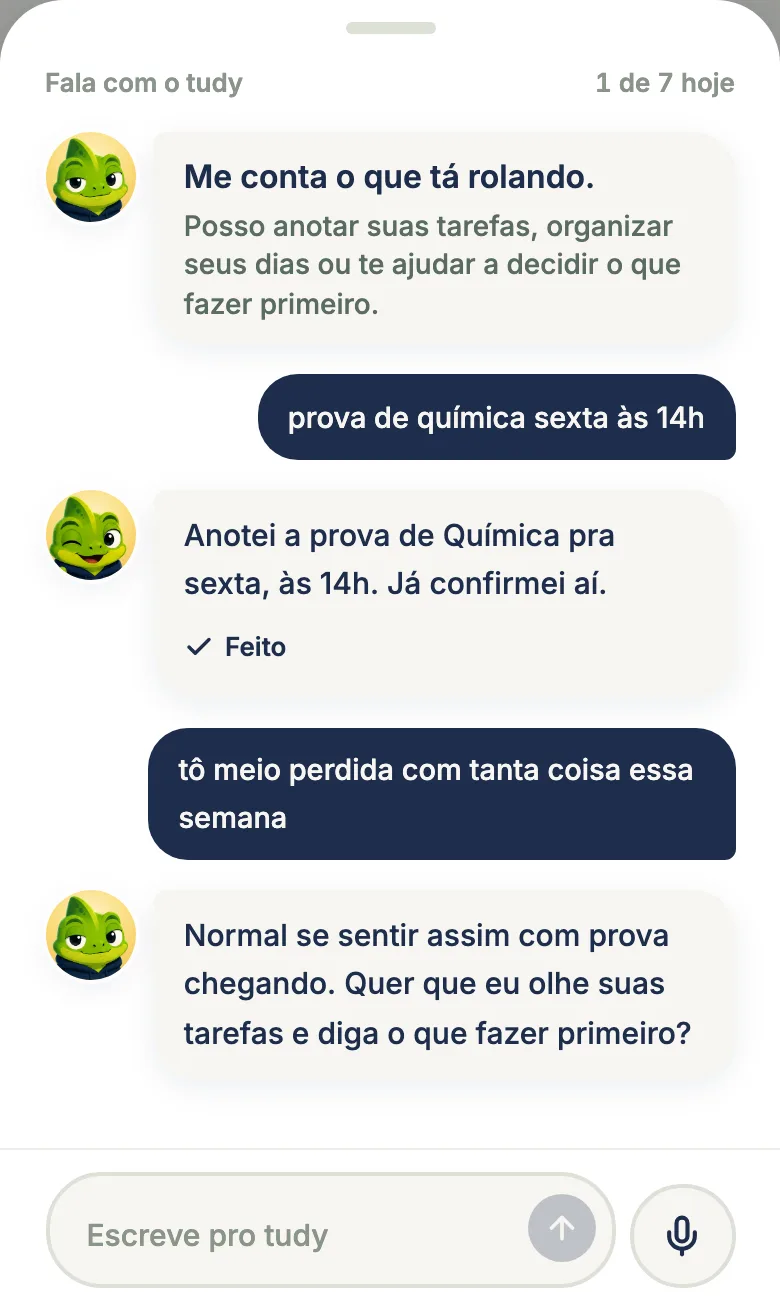
Talk to tudy is a chat where the tudy mascot plays the role of a study mentor, by text or voice: it builds exam plans, explains topics, quizzes you and suggests tasks, flashcards and calendar events. Nothing is added to the app until you tap Confirm. It’s part of Pro, with 7 messages a day.
What it does
You write the way you’d text a friend (“I have a Chemistry midterm Thursday and a paper due Friday, what should I do first?”) and tudy answers like an older classmate who knows your task list. It can:
- Give advice and organize: help you decide what to do first in a packed week and spread tasks across the days.
- Build an exam plan: create dated tasks leading up to a midterm, the SAT or a certification exam.
- Explain a topic step by step, in short answers.
- Run a practice round: 3 to 5 questions, graded in the next message.
- Make flashcards: a deck of 5 to 20 cards for a subject you already have. See Flashcards.
- Give feedback on writing you paste into the chat.
- Look at your performance: it receives numbers from your recent studying (minutes per subject, subjects you’ve neglected, overdue tasks) so it talks about facts, not guesses.
It also remembers things about you over time, like your routine and important exams.
You confirm everything
When tudy wants to change something, it shows a proposal with Confirm and Adjust buttons. Possible actions include creating tasks, events, subjects and topics; completing, rescheduling, editing or deleting tasks; adding subtasks; logging study time you already did (as manual time, with no XP); moving or deleting events; and creating flashcards. If you tap “Not now,” nothing happens. Tasks and events it creates show up in Tasks and the Calendar as if you’d made them yourself.
Text or voice
Text comes first, with messages up to 2,000 characters. The microphone sits next to the box for short voice messages. The audio is transcribed and not stored. The mascot bubble in the corner opens the chat directly on Home and Tasks.
What it remembers and what it keeps
- Memory: up to 20 short facts about you (your routine, big exams, subjects that weigh on you). No contact info, passwords or health details. You see and delete everything in Settings, under “What tudy knows about you.”
- Chats: the screen shows only today’s conversation. Chat text deletes itself after 30 days, and you can erase it sooner in Settings.
Plans and limits
| Free | Pro | |
|---|---|---|
| Talk to tudy | no (you’ll see an offer) | yes, 7 messages a day |
The daily limit resets each day. Pro is $3.99 a month or $29.99 a year, paid by card. With 7 messages, tudy tries to settle things in one reply and asks at most one question at a time.
What Talk to tudy doesn’t do
- It doesn’t read PDFs, slides or photos. It doesn’t open files.
- It doesn’t grade your exams automatically.
- It doesn’t act on its own. Without your Confirm, nothing is created, moved or deleted.
- It doesn’t replace your professor or your textbook. Like any AI, it can be wrong: check formulas, dates and facts before you memorize them.
- It doesn’t keep old chats on screen. Only today’s conversation shows.
- It doesn’t study for you. It helps you decide, plan and practice; understanding the material is still your job.
Why it lives inside tudy
The advantage of an AI inside the app is context: it sees your tasks, your events and your study time, so the answer starts from your actual semester, not a generic prompt. And because it proposes actions instead of just giving advice, the plan it builds turns into dated tasks on your list.
Frequently asked questions
What is Talk to tudy?
A chat where the tudy mascot acts as your study mentor, by text or voice. It gives advice, builds exam plans, explains topics, quizzes you and suggests tasks, flashcards and events, which only count once you tap Confirm.
How many messages can I send per day?
7 messages a day on Pro. Simple requests the app can read by itself, like adding a task with a date, may not use a message.
Does Talk to tudy read PDFs or grade exams?
No. It chats, plans and suggests actions, but it doesn't read files or grade exams automatically.
What does tudy remember about me?
Up to 20 short facts, like your routine and big exams, which you can see and delete in Settings. Chats delete themselves after 30 days and you can erase them anytime.